Free spreadsheet
Inventory & Reorder Spreadsheet
Keep track of the stock you buy and use. Record what comes in and goes out, and the spreadsheet shows what is on hand, what is already on order, and a suggested reorder list based on the thresholds you set. One stock location, one stock unit per item.
What do I have in stock, and what should I reorder?
How the numbers are worked out
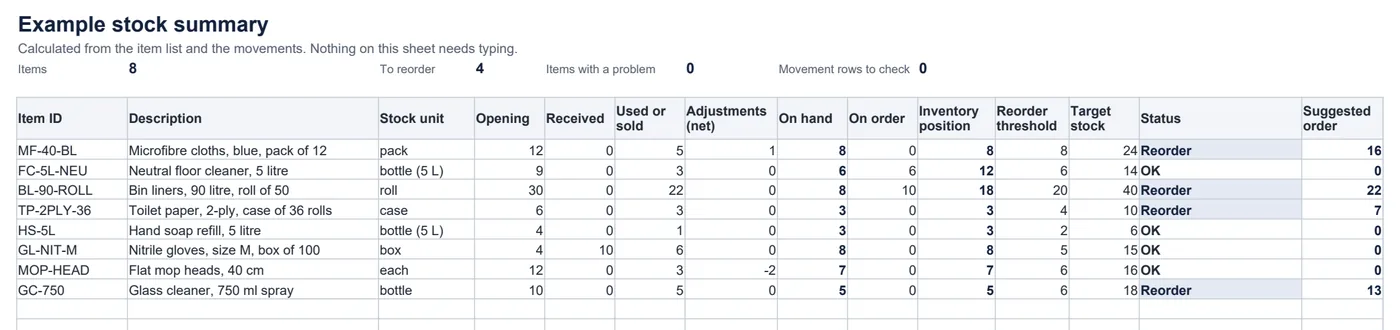
On hand = opening quantity + receipts − usage or sales + adjustmentsInventory position = on hand + quantity on orderIf inventory position ≤ reorder threshold: suggested order = max(0, target stock − inventory position)- Receipts and usage are entered as positive quantities. Adjustments are signed: +3 for stock found, −2 for stock lost or damaged.
- Every quantity is in the item’s own stock unit, shown next to each movement. Convert boxes or packs before entering them.
- Suggestions are not rounded. Round up to your supplier’s pack size when you order.
Worked example
Bin liners: 8 rolls on hand and 10 already on order make an inventory position of 18. That is at or below the reorder threshold of 20, so the suggestion is the target of 40 minus 18 = 22 rolls. Nothing is ordered until you order it; then add the 22 to “On order”.
What it does not do
- It does not place orders, contact suppliers or know about orders you have not recorded.
- It covers one stock location and one unit per item. It does not handle transfers between sites, barcodes, stock valuation or demand forecasting.
- To send an order to a supplier, use the purchase order generator.
Common questions
How is the suggested order worked out?
Inventory position is what you have on hand plus what is already on order. When that position is at or below the reorder threshold you set, the suggested order is your target stock minus the inventory position. Otherwise nothing is suggested. Suggestions are not rounded to pack sizes.
Does it know what I have ordered from suppliers?
Only what you record. When you place an order, add its quantity to “On order” on the item list. When the goods arrive, record a Receipt and reduce “On order” by the same amount, so nothing is counted twice.
What does it flag?
Duplicate item IDs, movements for an ID that is not on the item list, missing units, quantities with the wrong sign, a target that is not above the threshold, and negative stock. A movement with a problem is not counted until it is fixed; meanwhile its item is marked “Check: see the movements”, because its stock on hand is incomplete. No order is suggested for an item with a problem.
Which spreadsheet apps does it work in?
It is a standard .xlsx file using ordinary formulas (SUMIFS, COUNTIF, INDEX and MATCH), with no macros and no newer-only functions. We checked every calculation, and edits such as added rows and mistakes, in LibreOffice Calc. It is built for Excel, Google Sheets and Numbers too, but we have not tested it in those apps.