Skip to content

Free template

Delivery Note & Receiving Checklist

Two forms for each side of a delivery: a delivery note that shows the customer exactly what this delivery contains against the order — and what is still to come — and an internal checklist for counting what arrived, what you accepted, and what needs following up.

Free download · No account needed

Which side of the delivery are you on?

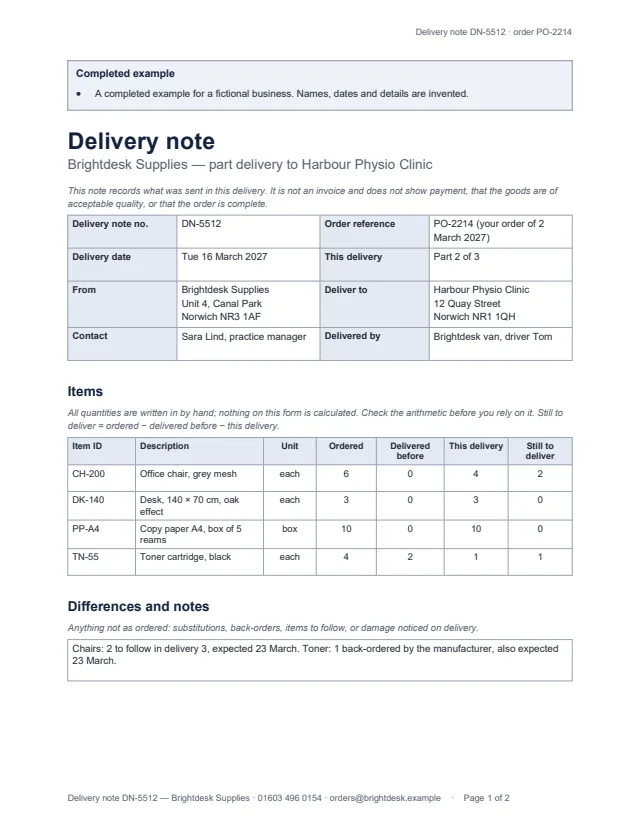
First page of the example delivery note: part 2 of 3 of an office furniture and supplies order Enlarge preview: Delivery note

Delivery note

Send it with the goods, for the customer.

Delivery note and order references, date, which part of the order this is, the sender and delivery address, then each item’s ID, unit, quantity ordered, delivered before, in this delivery and still to deliver; differences and notes; and who received it, with any exceptions.

Blank, for printing and an example · Word and PDF
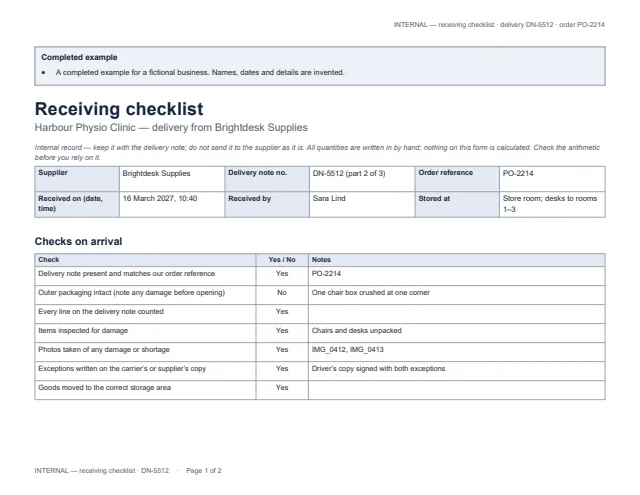
First page of the example receiving checklist, with the arrival checks Enlarge preview: Receiving checklist (internal)

Receiving checklist (internal)

Fill it in when a delivery arrives, before the goods are used or put away.

Checks on arrival, then for each item: on the delivery note, delivered (counted), accepted, not accepted and short; damage and shortages with photo references, follow-up action, owner and due date; and whether the order is complete. Landscape, marked INTERNAL on every page.

Blank, for printing and an example · Word and PDF

Get the documents

Choose a document, a version and a format. After the first download, the others need no new form.

Document
Version
Format

You will get delivery-note-blank.docx

Word files open in Microsoft Word, Google Docs, Apple Pages and LibreOffice; we checked them in LibreOffice. US Letter with room to write by hand; change the paper size for A4. The two examples are the same fictional delivery, so the quantities agree across both.

The worked example

  • A part delivery (2 of 3): four of six chairs, all three desks, ten boxes of paper on the note and one toner.
  • On arrival one chair is damaged and one box of paper is missing: 4 delivered = 3 accepted + 1 not accepted; 10 on the note − 9 counted = 1 short.
  • The order is not complete: three chairs (two to follow and one replacement), one box of paper and one toner are still to come.

Common questions

Does the form calculate the quantities?

No. Every figure is written in by hand, and the forms say so. The headings show the arithmetic — still to deliver = ordered − delivered before − this delivery; delivered = accepted + not accepted — so you can check it.

What is the difference between delivered and accepted?

Delivered is what you counted. Accepted is what you are keeping in usable condition. Damaged, wrong or unusable items go in “not accepted”, and anything on the delivery note that did not arrive goes in “short”.

Does a signed delivery note prove payment or acceptance?

No. It records what was sent and who took the delivery. It is not an invoice, does not show payment, does not confirm the goods are of acceptable quality, and does not show the order is complete.

What if the delivery has more lines than the table?

The tables continue onto the next page with their headings repeated, and the delivery note and order references are printed at the top of every page. In the Word file you can add rows.

Which apps do the files open in?

Word files open in Microsoft Word, Google Docs, Apple Pages and LibreOffice; the PDFs print as they are. We checked them in LibreOffice only.