Free spreadsheet
Income and Expense Tracker
Record the money your business actually receives and pays, and see each month’s totals and your closing cash balance. Loans, owner money, equipment purchases and transfers between your accounts are kept apart from day-to-day income and spending, so the picture stays honest.
Where did the money go this month?
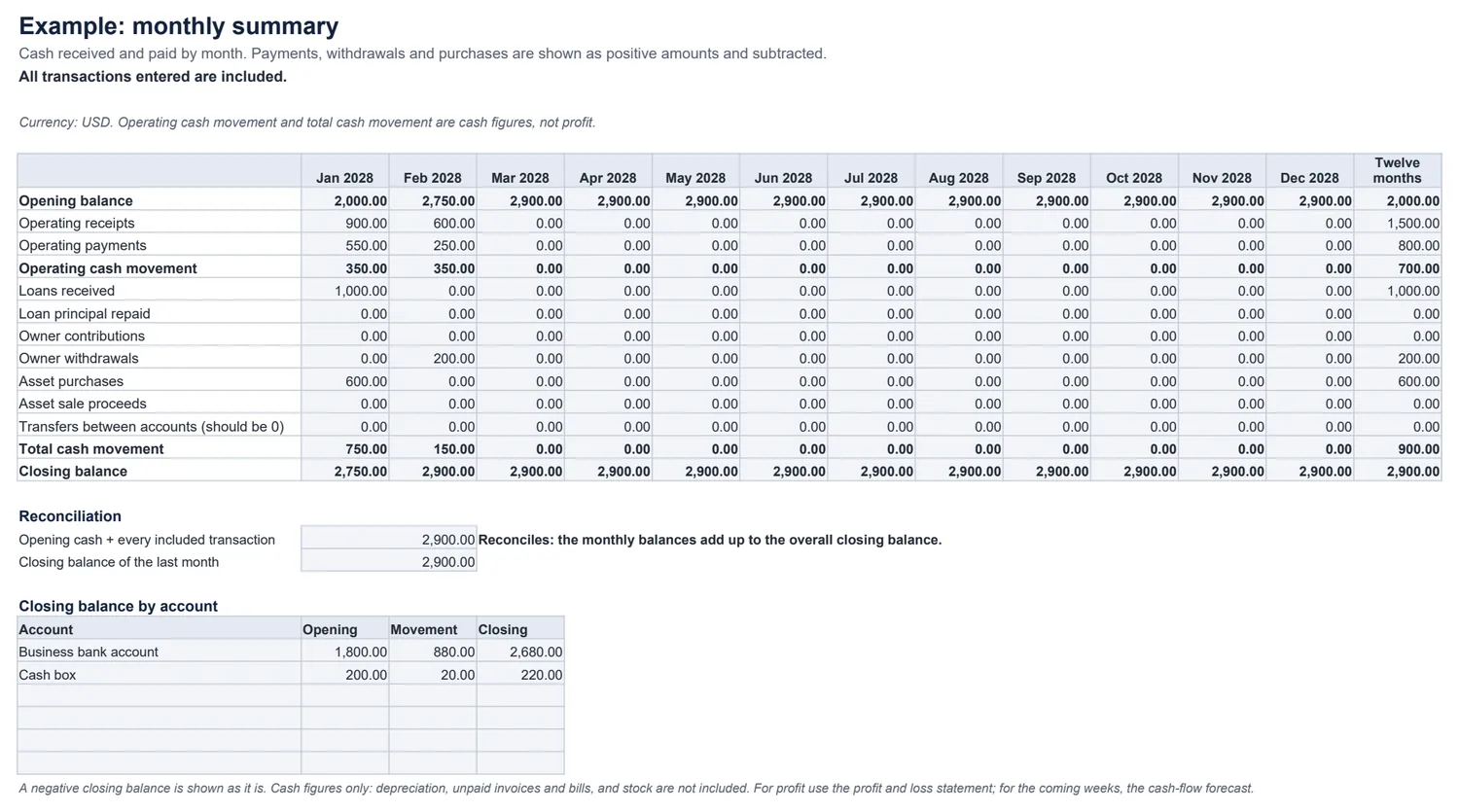
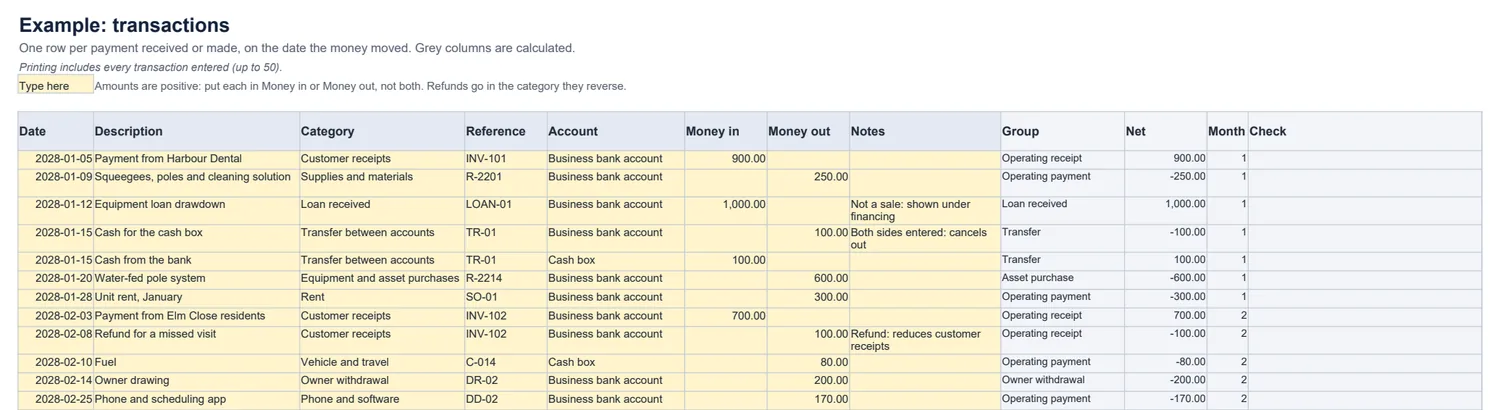
The worked example
Opening cash 2,000 + customer receipts 1,500 (after a 100 refund) + loan proceeds 1,000 − operating payments 800 − equipment 600 − owner withdrawal 200 = closing cash 2,900.
Operating cash movement is 1,500 − 800 = 700; total cash movement, including the loan, the equipment and the withdrawal, is 900. Neither figure is profit: the loan has to be repaid, and the equipment will last for years.
Which tool for which question
- Where did my cash go, month by month? This tracker.
- Did the business make a profit? The profit and loss statement.
- Will I have enough cash in the coming weeks? The 13-week cash-flow forecast.
- Am I spending what I planned? The business budget.
Common questions
How is this different from a profit and loss statement?
This records cash: money that actually arrived or left, on the day it moved. A profit and loss statement counts sales when they are earned and costs when they are incurred, and leaves out loans, owner money and equipment purchases. Use this to know where your cash went; use the profit and loss statement to see whether the business made a profit.
How do I record a loan?
The money you receive goes in the Loan received category, so it never counts as a sale. Each repayment is two rows: the principal part under Loan principal repaid (shown with financing) and the interest part under Loan interest (an operating payment). Your lender’s statement shows the split.
How do I record a refund or a reversal?
In the category it reverses, in the opposite direction. A refund you give a customer is Money out in Customer receipts, which reduces your receipts; a refund from a supplier is Money in in that cost’s category. A bank reversal of a mistaken payment is entered the same way, with the original reference.
What about moving money between my accounts?
If both accounts are listed on Setup, enter the transfer as two rows on the same date — Money out of one, Money in to the other — in Transfer between accounts. They cancel out, so they never count as receipts or spending, and the summary warns you if only one side was entered. Money moved to your personal account is an Owner withdrawal.
What happens with a mistake, like a missing date?
Rows with a missing or invalid date, a date outside the twelve months, an account or category not on Setup, or an amount that is missing, negative, text or in both columns are flagged and left out — and the summary says the totals are incomplete until they are fixed.
Which spreadsheet apps does it work in?
It is a standard .xlsx file with no macros or bank connection. We checked the example, the loan, refund and transfer treatments, the checks and adding rows as instructed in LibreOffice Calc. It has not been tested in Excel, Google Sheets or Numbers.