Free spreadsheet
Customer Complaint & Resolution Log
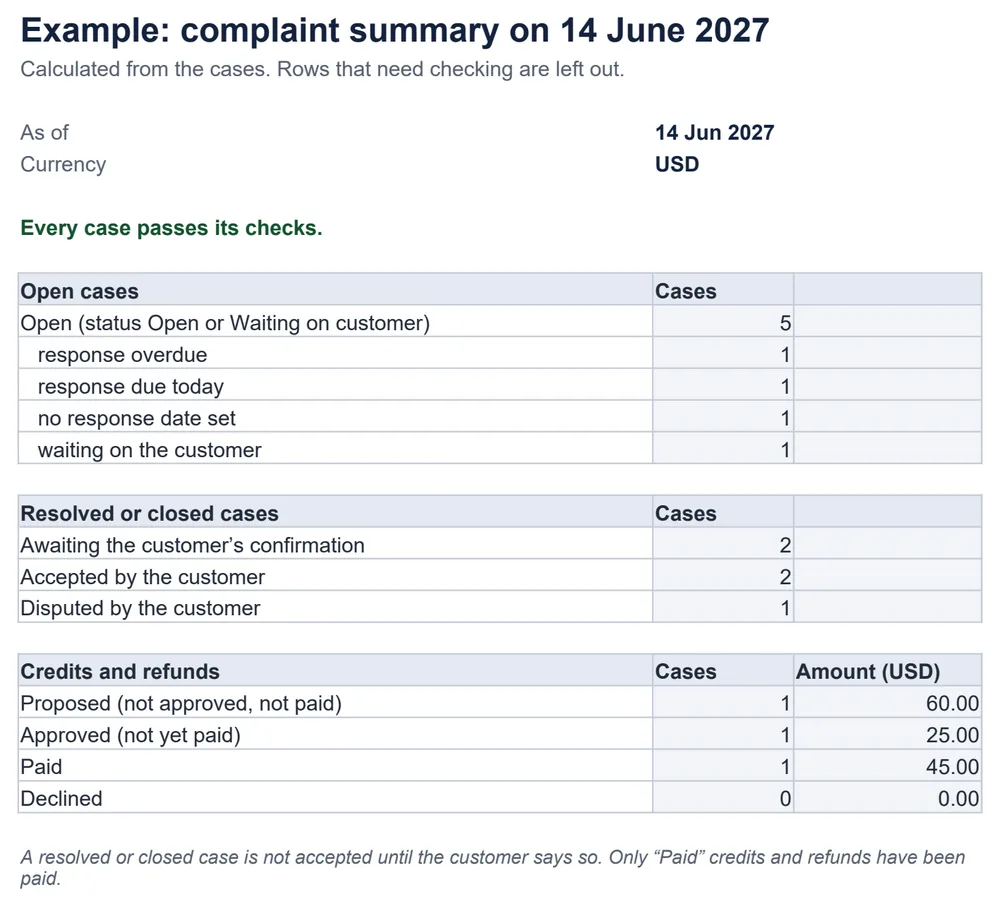
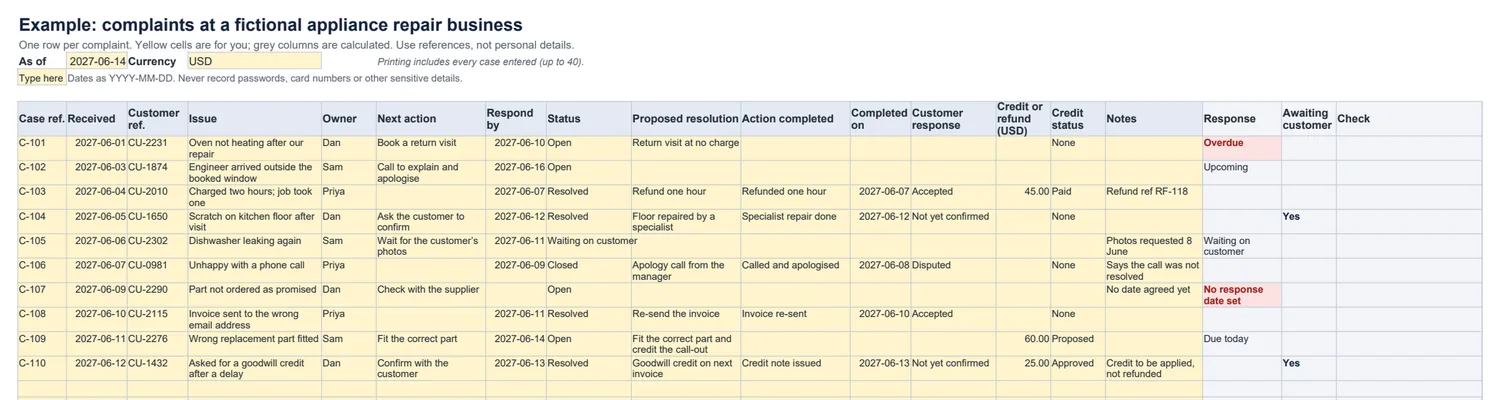
A simple register for complaints. Record who is handling each one, what you promised and by when, what was actually done, and whether the customer accepted it. The workbook shows open cases, overdue responses, cases waiting for the customer to confirm, and credits and refunds by status.
Which complaints still need a response?
The rules it follows
- Open means status Open or Waiting on customer. Overdue means Open with a response date before the as-of date.
- A blank response date is never overdue; it is listed as “No response date set”.
- A resolved or closed case is not accepted until the customer says so, and a proposed or approved refund is not paid.
- Problems — a duplicate case reference, a resolved case with no record of what was done, a credit amount without a status — are flagged and left out, and the summary says it is incomplete.
What it does not do
- It does not send replies or reminders. Write the reply yourself; nothing leaves the file.
- It does not decide what is fair or what you owe: the resolution and any refund are your decisions.
Common questions
When is a response overdue?
When the case is Open and the date you promised to respond is before the as-of date at the top, which starts as today. A case with no response date is shown as “No response date set” instead, so it is not hidden and not counted as overdue. A case waiting on the customer is not overdue either.
Why is customer acceptance a separate column?
Because closing a case is your decision and accepting the outcome is the customer’s. A resolved or closed case stays in “awaiting the customer’s confirmation” until you record Accepted or Disputed.
Does a proposed refund count as paid?
No. Each credit or refund has an amount and a status — Proposed, Approved, Paid or Declined — and the summary totals each status separately. Only Paid amounts have been paid.
What customer information should I record?
As little as you need: an account or order reference and the issue in a few factual words. Never record passwords, payment-card numbers, bank details, health information or other sensitive details.
Which spreadsheet apps does it work in?
It is a standard .xlsx file with ordinary formulas and no macros. We checked the example and edits — duplicates, missing dates, a changed as-of date, a case on the last row — in LibreOffice Calc. It has not been tested in Excel, Google Sheets or Numbers.