Free spreadsheet
Unpaid Invoice Tracker
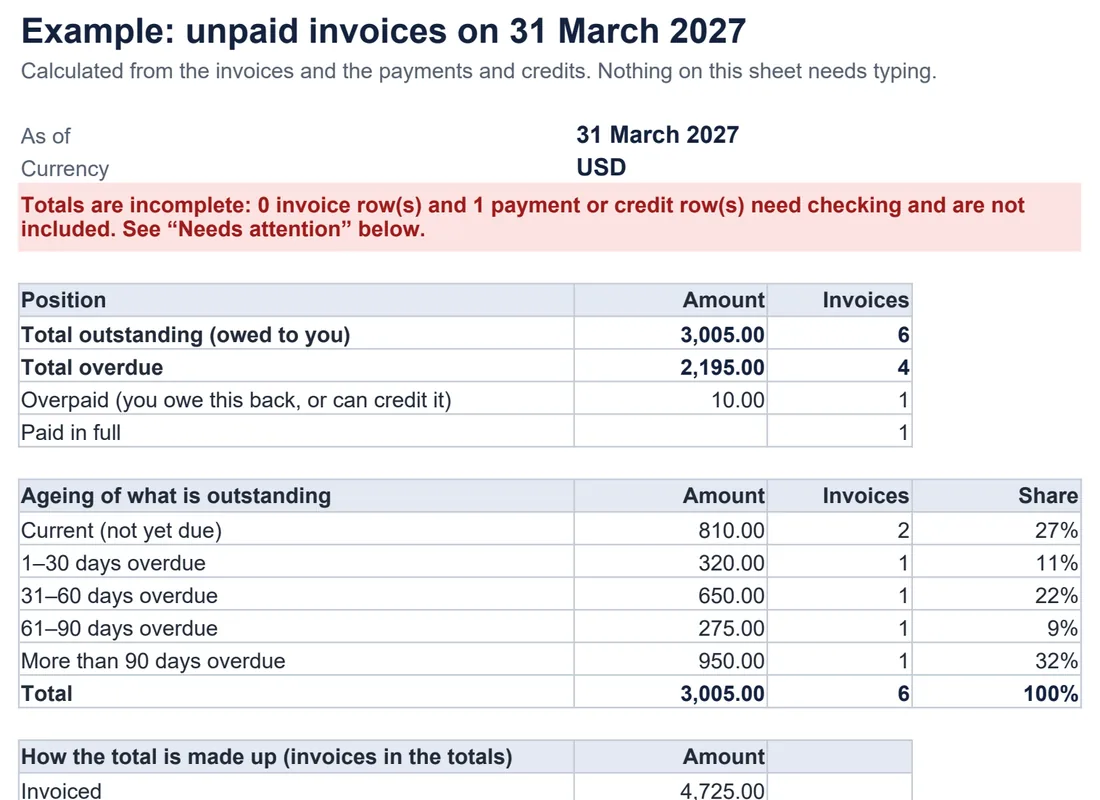
Keep a clear list of who owes you what. Record your invoices and the payments and credits against them, and the workbook shows each balance, what is overdue and for how long, and which follow-ups are due — as of any date you choose.
Who owes me money, and how overdue is it?
How the numbers are worked out
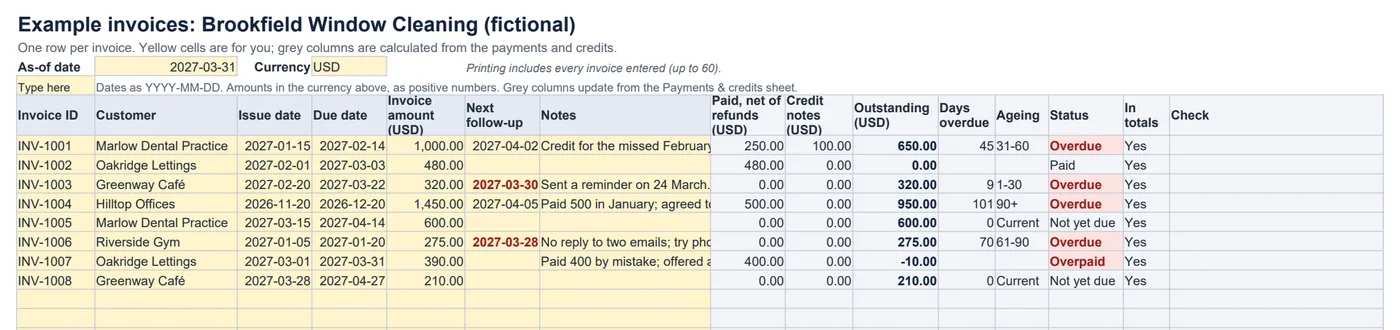
Outstanding = invoice amount − payments + refunds − credit notes (counting only entries dated on or before the as-of date)Days overdue = as-of date − due date, when something is still outstandingTotal overdue = outstanding on invoices past their due date- Amounts are entered as positive numbers; the type (Payment, Credit note or Refund) says which way they go.
- Rows with a problem — a duplicate or missing invoice ID, an impossible date, an amount that is not a positive number, or a payment not allocated to an invoice — are flagged and left out of the totals, and the summary says its totals are incomplete.
- One currency per workbook. Amounts in other currencies have to be converted before you enter them.
Worked example
Invoice INV-1001 is for $1,000. The customer paid $250 and you issued a $100 credit note for a missed visit, so $650 is outstanding. On 31 March it is 45 days past its due date, so it sits in the 31–60 days group.
What it does not do
- It does not send reminders, connect to your bank or accounting software, or charge late fees or interest.
- It does not convert currencies or work out tax.
- To write the reminder itself, use the payment reminder templates.
Common questions
What is the as-of date for?
Every balance is worked out as it stood on that date. The blank tracker starts with today’s date; type over it to see the position at the end of last month, for example. Payments and credits dated after it are listed as “not counted” and do not reduce any balance.
How are the ageing groups decided?
By how many days past its due date each unpaid invoice is on the as-of date: current (not yet due), 1–30, 31–60, 61–90 and more than 90 days overdue. Only the outstanding part of each invoice is counted.
What happens if a customer pays too much?
The invoice shows a negative balance and the status “Overpaid”, and the summary shows overpayments as their own total. They are not subtracted from what other invoices owe. Record a refund or a credit note when you settle it.
What if a payment arrives without an invoice number?
Enter it without an invoice ID. It is flagged as unallocated, it does not reduce any balance, and the summary says its totals are incomplete until you add the invoice it belongs to.
Which spreadsheet apps does it work in?
It is a standard .xlsx file using ordinary formulas (SUMIFS, COUNTIFS, SUMPRODUCT), with no macros and no newer-only functions. We checked every calculation, and edits such as added rows and mistakes, in LibreOffice Calc. It has not been tested in Excel, Google Sheets or Numbers.