Free spreadsheet
Customer Statement of Account
Send a customer a clear summary of their account: what they owed at the start of the period, every invoice, payment and credit note since, and what they owe now. Enter the transactions once; the statement sorts them by date, keeps a running balance and is ready to print or save as PDF.
What does this customer owe, and how did we get there?
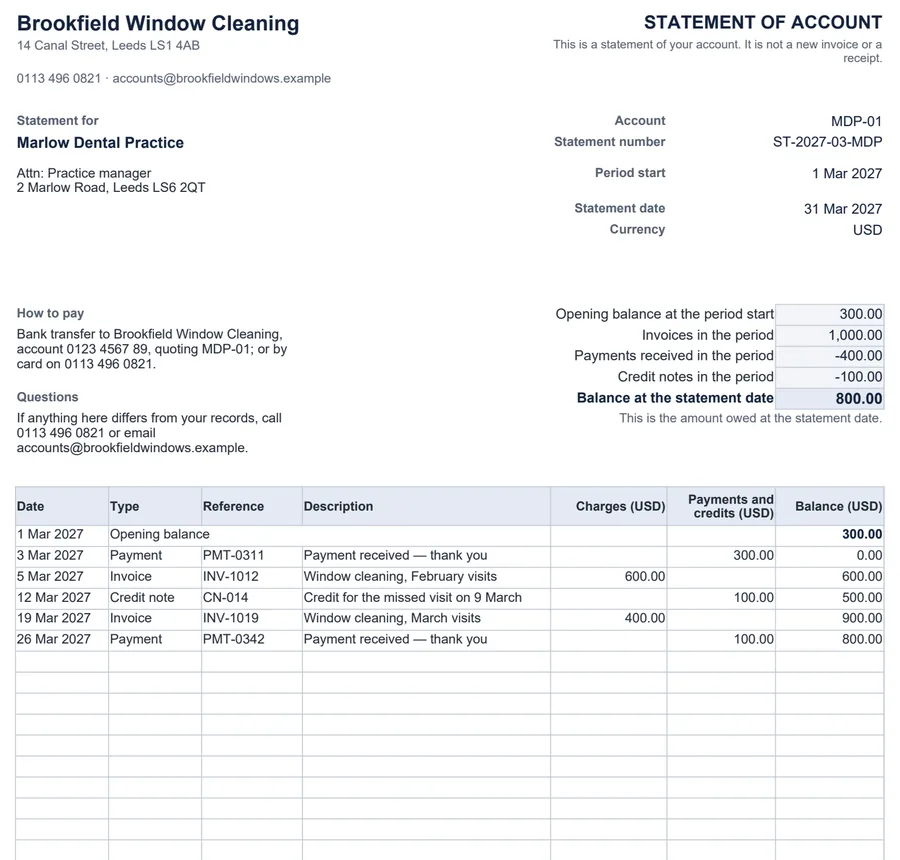
How the balance is worked out
Balance = opening balance + invoices − payments − credit notes (entries dated from the period start to the statement date)- Entries dated before the period start are flagged, because they belong in the opening balance.
- Entries dated after the statement date are left off this statement.
- While any entry needs checking, the statement shows a DRAFT banner so it is not sent by mistake.
Worked example
A customer owed $300 on 1 March. During March they were invoiced $1,000, paid $400 and received a $100 credit note, so on 31 March they owe $800. A payment dated 3 April stays off the March statement.
What it does not do
- It does not send statements, connect to accounting software or add interest or fees.
- It covers one customer at a time. To see every customer’s unpaid invoices together, use the unpaid invoice tracker.
Common questions
Is a statement the same as an invoice?
No. An invoice asks for payment for specific work. A statement summarises the account over a period — what was owed at the start, what was invoiced, paid and credited, and what is owed now. The statement says at the top that it is not a new invoice or a receipt.
How do I stop the opening balance being counted twice?
The opening balance is what the customer owed at the start of the period. List only entries dated from the period start onwards. An entry dated earlier is flagged and left out, because it is already part of the opening balance.
What about payments that arrive after the statement date?
Enter them when they arrive. They stay on the Entries sheet, marked as after the statement date, and do not appear on this statement or change its balance. They will belong on the next one.
Can my notes about chasing the customer end up on the statement?
No. The internal note column is on the Entries sheet only, and the statement never reads it.
Which spreadsheet apps does it work in?
It is a standard .xlsx file with ordinary formulas and no macros. We checked the example and edits such as early or late entries, mistakes and overpayments in LibreOffice Calc. It has not been tested in Excel, Google Sheets or Numbers.