Skip to content

Free template

Scope of Work Templates

Write down exactly what a job includes — and what it does not — before the work starts. Download a short or detailed template in Word or PDF, each with a completed example to show the level of detail that helps avoid misunderstandings.

Free download · No account needed

Which version do you need?

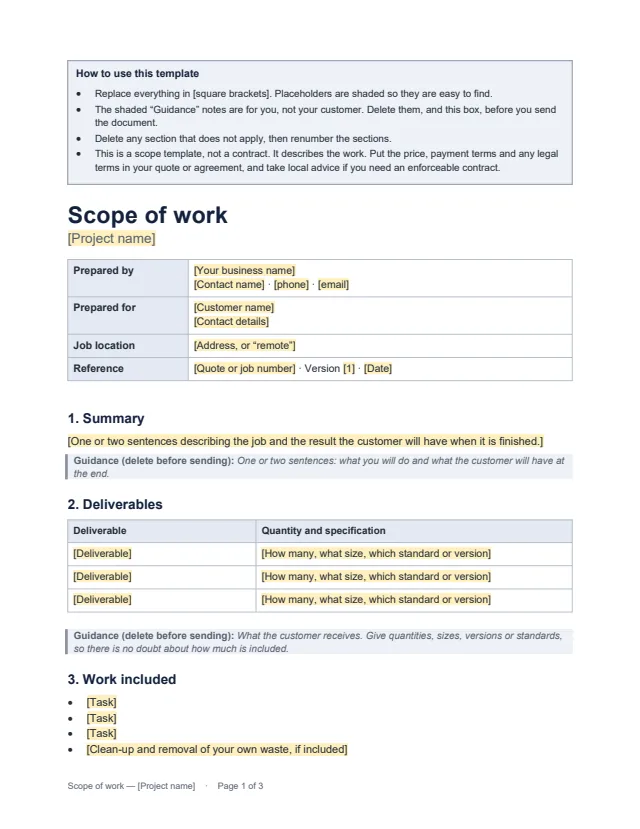
First page of the short scope of work template Enlarge preview: Short scope of work

Short scope of work

For a single job or visit with a clear result: a repair, an installation, a one-off design or a day of work.

Summary, deliverables, work included, exclusions, dates and dependencies, customer responsibilities, completion checks, changes and agreement.

Blank template and Completed example · Word and PDF

Example: repainting two bedrooms. The businesses and people in the examples are invented.
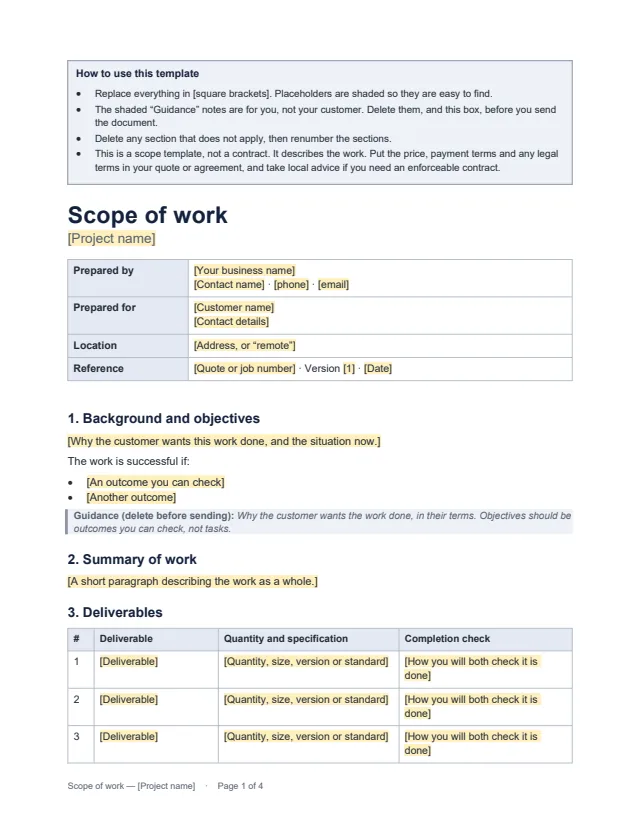
First page of the detailed scope of work template Enlarge preview: Detailed scope of work

Detailed scope of work

For larger or staged work with several deliverables, milestones or people involved.

Adds objectives, phases, assumptions, a milestone schedule, roles and contacts, access and materials, a review procedure and a change log.

Blank template and Completed example · Word and PDF

Example: building a five-page website for a bakery. The businesses and people in the examples are invented.

Get the documents

Choose a document, a version and a format. After the first download, the others need no new form.

Document
Version
Format

You will get scope-of-work-template-short.docx

Word files (.docx) open in Microsoft Word, Google Docs, Apple Pages and LibreOffice. US Letter size; change the paper size in your editor if you print on A4. No branding in the documents.

What a scope of work should cover

  • Who and where: your business, the customer, the job location and a reference that links the scope to your quote.
  • Deliverables: what the customer receives, with quantities, sizes, versions or standards.
  • Work included: the tasks you will do, including preparation and clean-up if they are part of the job.
  • Not included: anything the customer could reasonably assume is included but is not. Disagreements often start here, so be specific.
  • Dates and dependencies: start, milestones and completion, and what has to happen first for those dates to hold.
  • Customer responsibilities: access, decisions, information and anything else the customer must provide.
  • Completion checks: how you will both know the work is finished.
  • Changes: how a change is requested, priced and agreed before it is carried out.

Write completion checks you can both see

“Finished to a high standard” means different things to different people. A useful check is something both of you can look at or test on the day:

  • Instead of “walls painted properly”: two coats, with no bare or patchy areas visible in daylight from the middle of the room.
  • Instead of “contact form working”: a test enquiry sent from a phone arrives in the orders mailbox with every field filled.
  • Instead of “staff trained”: both staff members change a menu price on their own during the session.

How the templates are laid out

  • Everything to replace is in [square brackets] and shaded.
  • Notes for you are in shaded boxes labelled “Guidance (delete before sending)”. Delete them, and the instructions box at the top, before you send.
  • Delete any section that does not apply and renumber the rest.
  • These are scope templates, not contracts. Put the price and payment terms in your quote or agreement, and take local advice if you need an enforceable contract.

Common questions

Is a scope of work a contract?

Not on its own. A scope of work describes the work: what you will deliver, what is excluded, when, and how you will both know it is finished. The price, payment terms and legal terms belong in your quote, agreement or terms of business. If you need an enforceable contract, take advice where you trade.

What is the difference between a scope of work and a quote?

A quote says what the work will cost. A scope of work says exactly what the work is. Many businesses send both together, with the quote referring to the scope, so the price is tied to a clear description of the job.

Which version should I use?

Use the short version for most single jobs. Use the detailed version when the work has stages, several deliverables, other people involved, or a review step before it is signed off.

Can I edit the documents?

Yes. The Word files open in Microsoft Word, Google Docs, Apple Pages and LibreOffice. The PDFs show the same layout for printing or reading. The completed examples use invented businesses, so start your own document from the blank template.