Skip to content

Free template

Team Meeting & 1:1 Pack

Two meeting templates that lead to decisions and follow-through. The weekly team meeting spends its time on blockers and decisions, with every action owned and dated; the private 1:1 starts with the employee’s topics and ends with agreed actions.

Free download · No account needed

Which meeting is it?

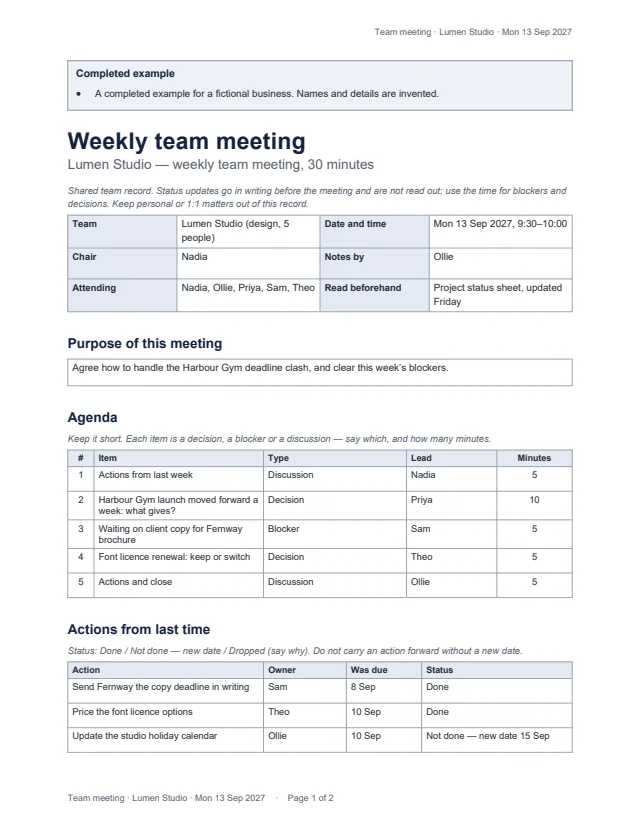
First page of the example weekly meeting for a five-person design studio Enlarge preview: Weekly team meeting

Weekly team meeting

A shared record for a short weekly meeting.

Purpose, a short agenda with each item marked as a decision, blocker or discussion and its minutes, actions from last time with their status, priorities and blockers with the help needed, decisions with the options considered, and actions with an owner and due date. Status updates are read beforehand, not in the meeting.

Blank, for printing and an example · Word and PDF
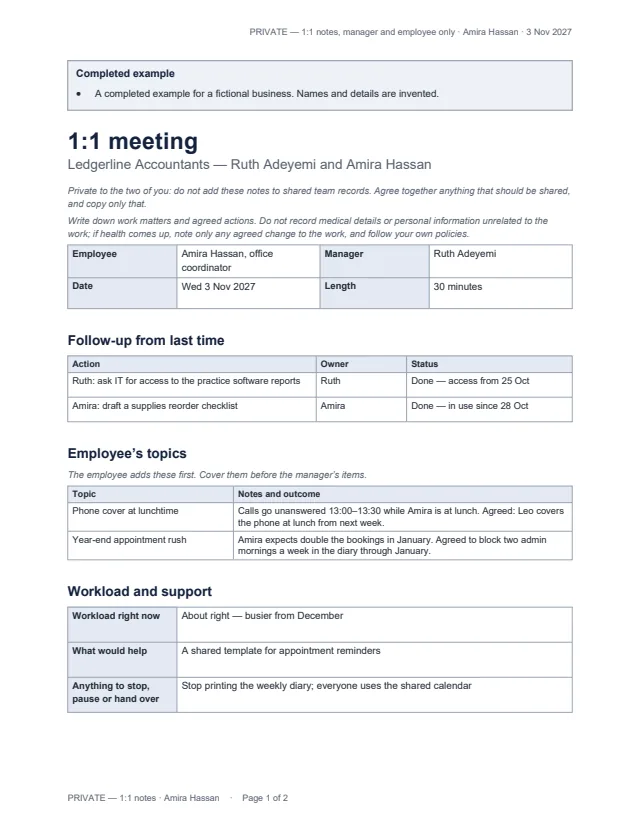
First page of the example 1:1 between a practice manager and an office coordinator Enlarge preview: Manager–employee 1:1 (private)

Manager–employee 1:1 (private)

Regular one-to-one meetings, kept between the two of you.

Follow-up from last time, the employee’s topics first, workload and support, feedback in both directions, development, and agreed actions — with a line for what you both agree to share with the team. Marked PRIVATE on every page.

Blank, for printing and an example · Word and PDF

Get the documents

Choose a document, a version and a format. After the first download, the others need no new form.

Document
Version
Format

You will get team-meeting-blank.docx

Word files open in Microsoft Word, Google Docs, Apple Pages and LibreOffice; we checked them in LibreOffice. US Letter with room to write by hand; change the paper size for A4. The examples use invented businesses and people.

Meetings that lead somewhere

  • Each agenda item is labelled as a decision, a blocker or a discussion, with a time limit.
  • Decisions record the options considered and who decided; anything undecided becomes an action with an owner.
  • The 1:1 is kept separate from team records, and only what you both agree is shared.

Common questions

Why are status updates not on the agenda?

Because they can be read beforehand. The meeting is for what needs the group: blockers someone needs help with and decisions that need making. The example uses its 30 minutes for a deadline clash and a licence decision, not round-the-table updates.

How do I stop actions drifting from week to week?

Every action has an owner and a due date, and the next meeting starts by checking them: Done, Not done with a new date, or Dropped with a reason. An action never rolls forward without a new date.

Should 1:1 notes go in the team record?

No. The 1:1 template is private to the manager and employee. If something from a 1:1 should be shared — like a change to how the team sends requests — agree it together and copy only that.

What should not be written in a 1:1?

Medical details and personal information unrelated to the work. If health comes up, note only any agreed change to the work, and follow your own policies.

Which apps do the files open in?

Word files open in Microsoft Word, Google Docs, Apple Pages and LibreOffice; the PDFs print as they are. We checked them in LibreOffice only.